about
entra id
entra id (Azure AD) is the central “directory store” containing all objects and resources (e.g., user accounts, managed identities, applications subscriptions, etc.) used by tenants
roles
Entra ID offers a wide range of permissions and simplifies their assignment by grouping them into roles. Microsoft provides various Microsoft Entra roles to streamline this process. As of today, there are 118 built-in roles. Microsoft is constantly improving its services. The number of roles might differ between your tenant and other tenants!
You can find all roles in the Entra admin center by following this link.
or use this graph script
# connect to Microsoft Graph
Connect-MgGraph -ContextScope process -Scopes RoleManagement.Read.Directory -NoWelcome

# count the number of roles
(Get-MgRoleManagementDirectoryRoleDefinition | measure-object).count

# display roles sorted by DisplayName
Get-MgRoleManagementDirectoryRoleDefinition | sort-object DisplayName

# store all roles in a variable
[array]$Roles=Get-MgRoleManagementDirectoryRoleDefinition

# show details for a role. The first one as an example
$Roles[0] | Format-List * -Force

# use the roleDefinitionID to retrieve all assigned permissions
Get-MgRoleManagementDirectoryRoleDefinitionInheritPermissionFrom -UnifiedRoleDefinitionId 62e90394-69f5-4237-9190-012177145e10 |
 Select-Object -ExpandProperty RolePermissions |
 Select-Object -ExpandProperty AllowedResourceActions
Note: To run the code above, you must connect to Microsoft Graph with at least RoleManagement.Read.Directory scope as outlined here.
roles categories
Microsoft refers to “three broad categories” of roles:
- Microsoft Entra ID-specific roles: permissions granted only in Entra ID
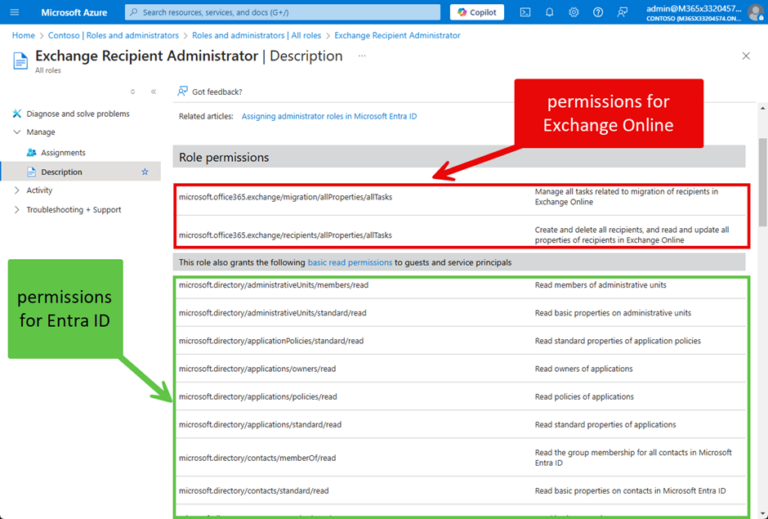
- Service-specific roles in Microsoft Entra ID: permissions granted in Entra ID and a workload like Exchange Online or SharePoint Online
- Cross-service roles in Microsoft Entra ID: these roles have been granted permissions across multiple workloads
example in exchange
role assignment
- Roles in Entra ID can be assigned in various ways; the simplest method is using the "Add assignments" option to directly assign users or groups to a role.
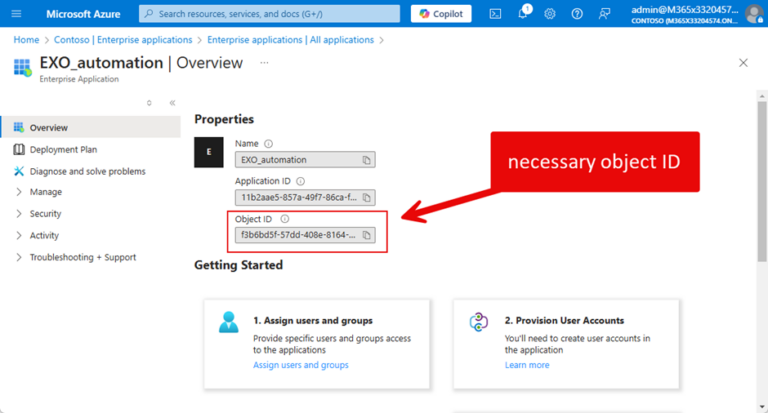
- Roles can also be assigned to "Enterprise Applications," requiring the Object ID found under "Enterprise Applications," as assignments are linked to the service principal, not the app itself. The reason why is that the assignment is to the service principal for an app instead of the app itself. Both enterprise apps and registered apps use service principals to hold role assignments.
 - Assignments made in this manner are permanent and remain until removed by an administrator.
- It is recommended to limit role assignments to "Enterprise Applications" to avoid over-permissioning and excessive privileges for registered apps.
- For assigning administrative roles to user accounts, tools like Privileged Identity Management or Entitlement Management should be utilized.
- Future discussions will cover custom RBAC roles and Administrative Units in Entra ID.
- Assignments made in this manner are permanent and remain until removed by an administrator.
- It is recommended to limit role assignments to "Enterprise Applications" to avoid over-permissioning and excessive privileges for registered apps.
- For assigning administrative roles to user accounts, tools like Privileged Identity Management or Entitlement Management should be utilized.
- Future discussions will cover custom RBAC roles and Administrative Units in Entra ID.