[[A SaaS provider's guide to securely integrating with customers' AWS accounts Datadog Security Labs]]
Summary
The article list Best practice for SaaS when integrating with customer's AWS account
Protect the customer's environment: How can you make sure that you're accessing your customers' AWS accounts in a secure way, with proper tenant isolation? - Minimize customer impact in case you are (as a provider) compromised: How can you minimize customer impact in case one of your own applications or cloud environments is compromised? - Secure your own cloud environment: What are some best practices to follow to secure the cloud environment that integrates with customers' AWS accounts?
Use IAM role instead IAM user
Don't ask your customers to create IAM users. Instead, have them create an IAM role, and set its trust policy to allow cross-account access from your own AWS account. IAM users have long-lived credentials that never expire
Leveraging IAM roles for your integration ensures that:
- You're not weakening the security posture of your customers by asking them to follow bad IAM practices;
- You don't have to store cloud credentials, which would be a large liability in itself;
- If your backend application leaks customer cloud credentials, they are only valid for a maximum of 12 hours.
Generate a random ExternalId and have your customers enforce it in their role's trust policy
When used in the context of a multi-tenant SaaS application, IAM roles can be vulnerable to the "confused deputy" attack.
To prevent confused deputy attacks, your service needs to generate an "external ID" that's unique to each customer. Customers must then configure their IAM role to ensure that the proper external ID is passed when your service performs the sts:AssumeRole call.
example [[A SaaS provider's guide to securely integrating with customers' AWS accounts Datadog Security Labs#Generate a random ExternalId and have your customers enforce it in their role's trust policy | here]]
Minimize and document permissions that your integration requires
Provide customers with the exact IAM policy they need to attach to their integration role. Projects such as iamlive, Policy Sentry, and IAM Zero can help you better understand what specific permissions your application needs.
Avoid the use of AWS managed policies
While policies like ReadOnlyAccess might seem like an easy way to grant limited permissions, AWS managed policies are typically over-privileged and allow overly-sensitive, unnecessary actions.
In addition, AWS can add or remove permissions from these policies at any time without notice, and they do so on a daily basis, granting you no control over its lifecycle.
Implement paved roads and guardrails for your customers
Provide configurable infrastructure as code modules for setting up integrations
request an easy, one-click way to set up your integration.
This is typically done through a CloudFormation template hosted on a public S3 bucket
examples [[A SaaS provider's guide to securely integrating with customers' AWS accounts Datadog Security Labs#Implement paved roads and guardrails for your customers | here]]
Use automation by requesting a Terraform provider with a resource to configure your AWS integration.
examples [[A SaaS provider's guide to securely integrating with customers' AWS accounts Datadog Security Labs#Implement paved roads and guardrails for your customers | here]]
check integration role when external IDs are not enforced
examples [[A SaaS provider's guide to securely integrating with customers' AWS accounts Datadog Security Labs#Implement paved roads and guardrails for your customers | here]] and AWS guide
check if the integration role when it's dangerously over-permissive
examples [[A SaaS provider's guide to securely integrating with customers' AWS accounts Datadog Security Labs#Implement paved roads and guardrails for your customers | here]]
Make integration more resilient to 3P potential compromise
list of things to increase resilience when 3P compromise happens
Make sure vendor is monitoring usage of outbound integration role through CloudTrail AssumeRole events
some anomalies to be aware for: (vendor should be monitoring this)
- The role is assumed by a human operator: This could indicate an operator attempting to compromise customer credentials.
- The role is assumed by a non-AWS IP address: This could indicate that someone outside of your infrastructure has attempted to compromise the role.
- A specific session of the role is used in different locations: This could indicate that your backend application was compromised, and that an 1attacker has exfiltrated its credentials outside of your environment.
- An unusual number of AssumeRole calls are performed: If you have 100 customer environments you're scanning once a day, you should be concerned if your outbound integration role starts mass-assuming customer roles within a short time window.
- Unusual role session names: If your backend application assumes integration roles with a specific session name, you want to know when something looks off.
- [ ] check if this should be on AWS protect compendium
consider using a dedicated bastion AWS account
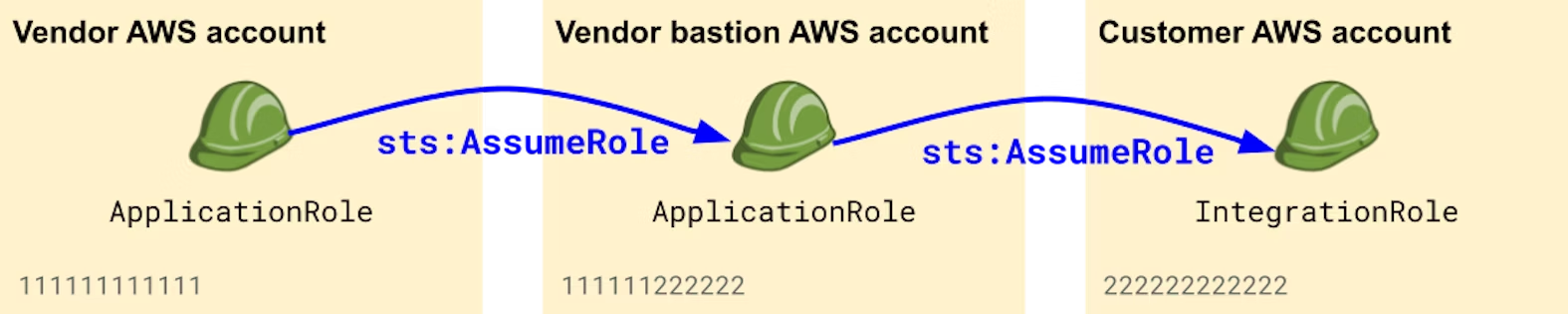
[[A SaaS provider's guide to securely integrating with customers' AWS accounts Datadog Security Labs]]
Make judicious use of STS Session Policies
When assuming an IAM role, you can choose to restrict the effective permissions of the returned credentials by using Session Policies. This can be useful when you know that the operations you're about to perform don't require as many privileges as the ones granted to the role.
- [ ] read more on STS session policies
When Saas uses microservices for different thing (cost monitoring, scanning posture): In that case, session policies are valuable to make sure that each microservice has access to minimally scoped credentials, independently of the privileges that are granted to the assumed IAM role.
Maintain dynamic list of 3P used IP ranges
if allow-list of fixed IP is impossible, strive to maintain dynamic IP used by 3P( example https://docs.datadoghq.com/api/latest/ip-ranges/)
for example monitor if AssumeRole come from unlisted IP list.
Use regional outbound integration roles
if you operate in several region, consider using a dedicated outbound integration role per region, and instruct customers in each region to trust the appropriate role. Limit exposure to that region when things go bad.